Updated October 22, 2026
If you own a WordPress website, you may have heard about a major security alert making headlines this week.
On October 21, 2026, the PHP project released emergency security updates for two critical vulnerabilities in PHP, the programming language that powers WordPress and a huge share of the rest of the web. The vulnerabilities are known as PHP2Shell.
That sounds alarming. And to be clear, it's serious.
But here's the good news: patches are available, and most of the major hosting companies have moved quickly to protect their customers.
Let's break down what happened, what it means for your business website, and what to do next.
The Short Version
This isn't a WordPress problem. It's a flaw in PHP itself, so updating WordPress, your theme, and your plugins won't fix it
The fix has to happen on your hosting server. That's either your hosting company's job or yours, depending on your plan
Most major hosts say they've patched or protected their customers. Details by company are below
Don't assume. Confirm. A quick check of your PHP version, or a message to your host, can give you peace of mind
What Happened? (In Plain English)
Think of your website like a house.
WordPress is the structure. Your themes and plugins are the features inside. And your hosting company provides the land and utilities that keep everything running.
PHP is part of the behind-the-scenes machinery that makes your WordPress website work.
Security researchers discovered two serious weaknesses in that machinery. Both could let an attacker run their own code on a website's server without needing a username or password. In the wrong hands, that could mean stolen information, changed website content, or a full takeover of the server.
The vulnerabilities are officially tracked as CVE-2026-109618 and CVE-2026-109619. Both are rated Critical, with a severity score of 9.2 out of 10.
Here's the part I want you to remember:
This is not a problem with WordPress itself or with a particular plugin. It's a security issue in PHP, the underlying programming language.
That means even a website with a fully updated WordPress, theme, and plugins could still be at risk if its hosting server hasn't received the PHP security patch. Fun, right?
It also reaches back a long way. The affected versions go back more than a decade, to PHP 5.4. And Hostinger reports that exploit code for one of the flaws was already circulating before the official fix came out, which is why hosting companies have been moving so fast.
Read the official PHP security announcement
What Are Hosting Companies Doing About It?
When a vulnerability like this hits, your hosting company plays a big role in protecting your website.
Companies like GoDaddy, Hostinger, Bluehost, DreamHost, GreenGeeks, and SiteGround provide the servers that run WordPress websites. Depending on your hosting plan, they may handle PHP updates for you automatically, or they may leave it up to you.
Here's what each company has reported as of the morning of October 22, 2026.
GoDaddy: Managed WordPress, Web Hosting, and Windows Hosting Patched
GoDaddy confirmed on October 21 that it had patched all PHP versions on its Managed Hosting for WordPress platform. As of its latest update on October 22, it says Web Hosting and Windows Hosting are patched too. If your website is on one of those plans, no action is needed.
VPS customers are in a different situation. GoDaddy VPS and other self-managed servers are the customer's responsibility to update.
Read GoDaddy's official security update
Hostinger: Every Plan Except VPS Patched
Hostinger says the PHP fix is now installed on all of its hosting servers except VPS, which customers manage themselves. It also says it blocked the exploit attempts that were already circulating before the official fix was released.
If you're on a managed Hostinger plan, there's nothing for you to install. If you're on VPS hosting, you're responsible for updating PHP on your own server and restarting it.
One helpful tip from Hostinger: on managed hosting, the fix is built into the PHP version your site already runs, so the version number may not change. To check, look at the Build Date in your PHP Info. A build date of October 21, 2026 or later means your site has the fix.
Read Hostinger's official PHP2Shell update
Bluehost: Security Updates Being Deployed
Bluehost has published an ongoing status update and confirmed that patched PHP builds are being deployed across its hosting infrastructure. As of its October 22 update, it reported significant progress, with work continuing on remaining systems.
You can check your site by viewing your PHP info. Bluehost says that if the version shown matches or is newer than the patched versions on its status page, your site is patched. If you run a self-managed VPS or dedicated server, you'll need to run the update yourself through your control panel.
One thing to know: Bluehost put temporary mitigations in place that may limit file upload sizes. If a large upload suddenly fails this week, that may be why.
Read Bluehost's hosting security status
DreamHost: Protections in Place, Patch Rolling Out
DreamHost says it put protections in place across all of its hosting platforms (shared, VPS, DreamPress, and dedicated) on October 21, before the official fix was even available. It also reports that its firewall is blocking exploit attempts.
As of its October 22 update, DreamHost says the official PHP security fixes have been applied across the bulk of its network, and its operations team is finishing testing on the remaining server groups. DreamHost says no action is needed from customers. For sites still on PHP 8.1 and older, it says protections are in place, with fixes through its PHP Extended Support program expected to follow.
Read DreamHost's status update
SiteGround: Protected, and Fixes Now Applied
SiteGround says it put server-level protections in place across its servers before the official PHP updates were released, then applied PHP's official fixes the same day. Its post was updated on October 22 to confirm the fixes are now applied across all SiteGround servers. SiteGround says customers don't need to change anything.
Read SiteGround's security announcement
GreenGeeks: Confirm Your Patch Status
GreenGeeks supports multiple PHP versions and gives customers PHP management tools in its hosting control panel.
However, as of October 22, I could not find a public GreenGeeks announcement confirming that its PHP2Shell patch rollout is complete.
That does not mean its servers are unpatched. It just means you shouldn't assume. If your website is hosted with GreenGeeks, I recommend contacting them directly to confirm that both critical PHP vulnerabilities have been addressed on your account.
View GreenGeeks' PHP support documentation
WordPress.com: Protection Confirmed
Automattic, the company behind WordPress.com, confirmed that websites hosted on WordPress.com, WordPress VIP, WP Cloud, Pressable, and Tumblr were protected as of October 21. There's nothing for those customers to do.
Keep in mind that this applies to those managed services, not to every WordPress website hosted somewhere else.
Read Automattic's official announcement
A quick reminder: a hosting company announcing a fix doesn't mean every hosting plan works the same way. Managed WordPress hosting, shared hosting, and privately managed servers all have different responsibilities. That's why confirming your own website's status matters.
How Can You Tell if Your WordPress Website Is Protected?
If you're comfortable logging into WordPress, you can check which PHP version your website is running.
Log into your WordPress dashboard
Go to Tools → Site Health
Select the Info tab
Expand the section labeled Server
Look for PHP Version
The official security fixes were released in these versions:
PHP 8.5: 8.5.12 or newer
PHP 8.4: 8.4.27 or newer
PHP 8.3: 8.3.36 or newer
PHP 8.2: 8.2.35 or newer
For example, if your website is running PHP 8.3.36, it has the official fix.
But there's a catch. Some hosting companies install the security fix into older PHP versions without changing the version number you see. In that case, your hosting provider needs to confirm the patch has been applied.
If you're on PHP 8.1 or older, take that seriously. The PHP project no longer supports those versions, so you'll need either a hosting-provider update that backports the fix, or a planned upgrade to a supported version. And since PHP 8.2 reaches end of life on December 31, 2026, aiming for PHP 8.3 or newer is the smarter target.
One word of caution: don't randomly change your PHP version without checking your website's compatibility. Some older WordPress themes and plugins can stop working when PHP is upgraded. Always back up your website and test the important features first.
Already a Be Digital Marketing WordPress Maintenance Client? I've Got You.
You have a business to run. You shouldn't have to become a website security expert every time a new vulnerability makes the news.
That's exactly why ongoing website maintenance matters.
For my monthly WordPress maintenance clients, I'm reviewing PHP versions and working to verify that the right hosting-level security fixes are in place, no matter which hosting company you use.
Ongoing maintenance is all about keeping your website healthy, secure, and working properly. That includes:
Regular WordPress, theme, and plugin updates
Reviewing website health and security concerns
Checking PHP versions and coordinating important hosting updates when needed
Monitoring for issues that could affect performance or functionality
Helping identify when additional troubleshooting or security work is needed
No website can ever be guaranteed 100% secure. But having someone keeping an eye on updates, security warnings, and website health makes a meaningful difference.
The goal is simple: you focus on running your business, and I help keep your website running safely behind the scenes.
If you're already on my monthly WordPress maintenance plan, you don't need to navigate this alert alone. And if you're not on a maintenance plan, this is a good reminder of why ongoing technical support is worth considering.
What Does This Mean for the Future of Business Websites?
This week is a good example of something I've been saying for a while: the technology behind business websites is changing.
WordPress has been an incredibly popular platform for years, and when it's properly maintained, it can still be a reliable and secure solution.
But today's businesses have more options than ever.
At Be Digital Marketing Co., I'm expanding beyond traditional WordPress websites and building modern custom websites and business platforms using AI-assisted development and cloud technologies like Vercel and Supabase.
These aren't WordPress sites with a different coat of paint. They're built on a different architecture.
Traditional WordPress vs. Modern Custom Websites
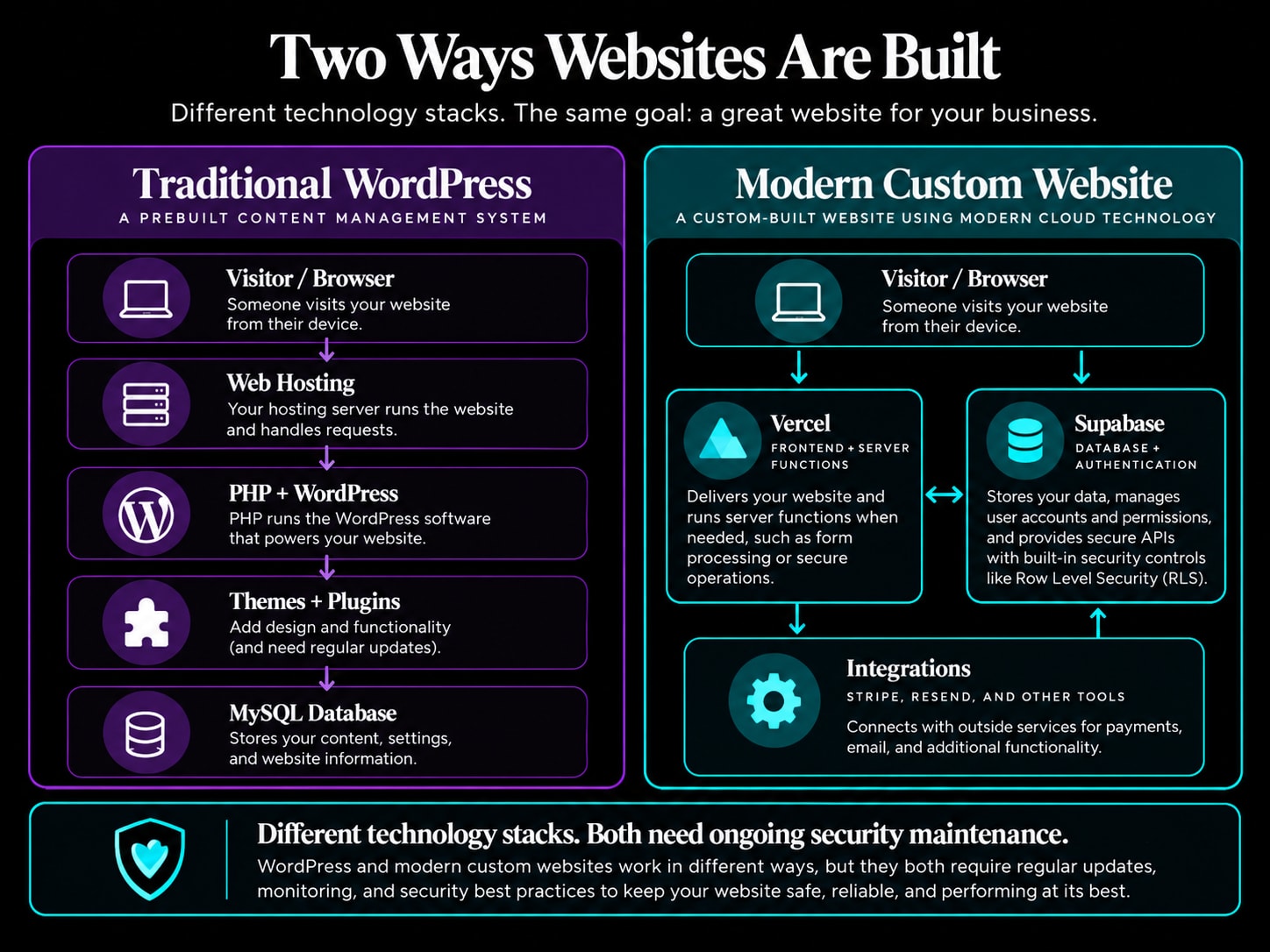
A traditional WordPress website relies on PHP, a database, and often a stack of themes and plugins to provide its design and features. Every one of those pieces needs ongoing maintenance and security attention.
A modern custom website can use a platform like Vercel to deliver the website and Supabase to manage the database, secure user accounts, and application features.
For many of these projects, PHP isn't part of the technology stack at all. So a PHP-specific vulnerability like this week's wouldn't directly affect a website that doesn't use PHP.
This kind of architecture can also reduce the need for lots of third-party plugins and give you more flexibility in how your features are designed.
But let's be clear: modern websites still need security updates, monitoring, and responsible development. AI-built doesn't mean automatically secure. It means we have new ways to build and maintain websites, with different security responsibilities.
Whether it's WordPress or a modern custom platform, a website needs knowledgeable oversight.
Modern Websites Built for Security, Flexibility, and Growth
I believe your website should do more than look good. It should support your business today and give you room to grow tomorrow.
Unlike traditional WordPress sites that lean on lots of third-party plugins and constant compatibility updates, my modern custom websites are built on cloud infrastructure with functionality tailored to your business.
When we build only the features your business needs, we can reduce unnecessary software dependencies, improve performance, and design security controls around your specific website. The cloud hosting platforms handle the underlying infrastructure, and I provide the ongoing support, maintenance, and security oversight that fits each project.
And we go well beyond brochure websites. I build custom client portals, membership systems, scheduling tools, databases, and business automations that make running a business easier.
Whether you're maintaining an existing WordPress website or exploring something more modern, the most important thing is having the right technology and someone you trust to help manage it.
Need Help Keeping Your Website Secure?
If you're concerned about your WordPress website's PHP version, you're not sure whether your hosting company has installed the latest security updates, or you'd like to learn more about modern website solutions, I'm here to help.
Let's make sure your website is working for your business, not creating one more thing for you to worry about.
Explore Our Modern Website Design Services
Contact Be Digital Marketing Co.
Security information last reviewed October 22, 2026. Hosting companies continue to publish updates, and individual server configurations may vary. Confirm the latest status with your hosting provider.
Found this helpful? Share it with a fellow small business owner.
← More Posts